
LinkedIn Patches #88 Answer & Analysis
Stuck on LinkedIn Patches #88? Get spoiler-friendly Patches hints, the final grid solution, and a clear step-by-step explanation for today’s LinkedIn Patches puzzle.
This page includes the final answer and full analysis for LinkedIn Patches #88. Use the hints first if you want to solve the puzzle before revealing the answer.
LinkedIn Patches #88 Hints
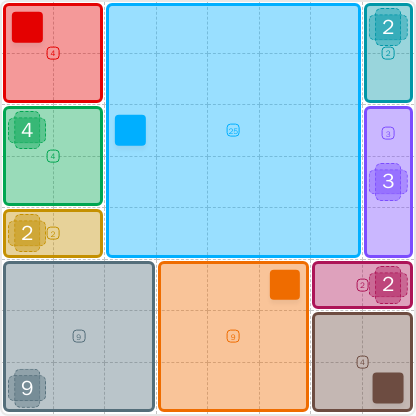
For LinkedIn Patches #88, the fastest route is to lock in the smallest corner and edge patches first. The top-left, top-right, and right-edge clues are all tightly constrained, so they give you the earliest forced placements in today's LinkedIn Patches puzzle.
The large central patch is the main divider in this grid. Once you see how much space is reserved around the border pieces, the center becomes a clean rectangle instead of something you have to guess.
The right edge has several small regions stacked vertically. That makes the far-right column much easier to solve than it first looks, because each patch has very limited room to expand without breaking connectivity.
The lower-left and lower-middle 9-cell patches are strong shape clues. In a puzzle like this, a 9-cell region often wants a neat 3×3 footprint, and the surrounding borders help confirm that.
If any cell is left stranded near the lower-right or between the big center block and the bottom sections, the solution is wrong. The correct grid for LinkedIn Patches 2026-06-13 07:42:34 fills every cell with connected patches and no overlaps.
Still Stuck? Click on Reveal Patches #88 Answer below.
LinkedIn Patches #88 Answer
Original Puzzle
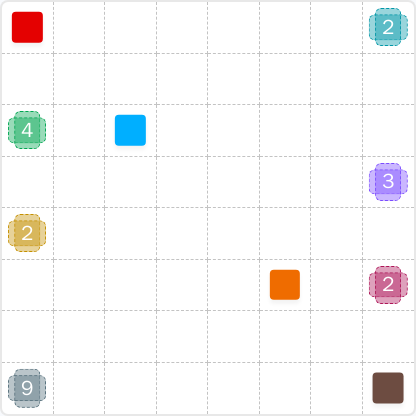
Final Answer
How to Solve LinkedIn Patches #88
Previous Patches Answers

Play Unlimited Patches Games
Enjoy unlimited Patches and other puzzle games anytime. No daily limits, just endless fun!
Play Now - Unlimited GamesMore LinkedIn Games Answers for Jun 13, 2026


Patches #88 FAQ
The LinkedIn Patches answer for puzzle #88 on 2026-06-13 07:42:34 is the solved layout shown on this page, with the corner patches locked first and the large center region placed around them.
Start with the smallest edge and corner patches, then fit the large central region, and finish with the bottom bands. That order makes today's LinkedIn Patches puzzle much easier to control.
The best LinkedIn Patches #88 hints are to use the corners first, treat the 25-cell region as the main anchor, and check the right edge for narrow forced spaces.
The numbers show how many cells each patch must contain. In Patches puzzle pages, that count is the key rule for building correct connected regions.
R2C7 means row 2, column 7. Rows are counted from top to bottom and columns from left to right, which makes grid solutions easier to read.
Look for the most restricted patches first, especially corners, edges, and large regions with limited room. That is the fastest way to approach a daily Patches solution.
The LinkedIn Patches FAQ and the solved grid are included on this answer page, along with concise Patches hints and a clear Patches puzzle guide.