
LinkedIn Patches #87 Answer & Analysis
Stuck on LinkedIn Patches #87? Get spoiler-friendly Patches hints, the final grid solution, and a clear step-by-step explanation for today’s LinkedIn Patches puzzle.
This page includes the final answer and full analysis for LinkedIn Patches #87. Use the hints first if you want to solve the puzzle before revealing the answer.
LinkedIn Patches #87 Hints
For LinkedIn Patches #87 on 2026-06-12 11:33:47, begin with the biggest clues on the border. Edge and corner patches are usually the most restricted, so they give you the fastest progress in today's LinkedIn Patches puzzle.
One patch wants to stretch almost the full top row, and another is locked to the far-right edge. When a number has very few straight-line options, it is often the first reliable placement in a Patches puzzle guide.
The upper-left area becomes a compact block very early. If you place that corner patch correctly, the adjacent upper-middle region has only one realistic shape left, which helps narrow the LinkedIn Patches answer.
A central horizontal patch splits the board into top and bottom sections. In many Patches solutions, that kind of region prevents small patches from drifting upward or downward, so use it to lock in the middle.
The remaining lower spaces are narrow and rectangular, so they have very little freedom. Watch the bottom-left corner and the lower-right block closely, because they complete the grid once the larger patches are fixed.
Still Stuck? Click on Reveal Patches #87 Answer below.
LinkedIn Patches #87 Answer
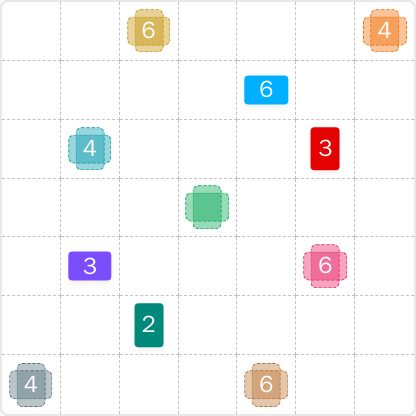
Original Puzzle
Final Answer
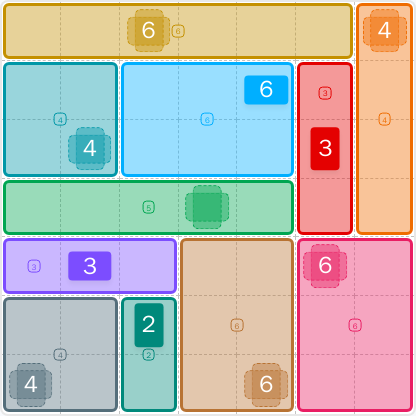
How to Solve LinkedIn Patches #87
Previous Patches Answers

Play Unlimited Patches Games
Enjoy unlimited Patches and other puzzle games anytime. No daily limits, just endless fun!
Play Now - Unlimited GamesMore LinkedIn Games Answers for Jun 12, 2026


Patches #87 FAQ
The LinkedIn Patches answer for puzzle #87 is the solved 7x7 layout shown on this page for 2026-06-12 11:33:47.
Start with the forced edge pieces, then place the central divider, and finish with the compact bottom regions. That is the fastest path in this Patches puzzle guide.
The best LinkedIn Patches #87 hints focus on edge clues, corner patches, and the central band that splits the board into smaller regions.
Each number shows how many cells that patch must contain. The cells must stay connected, so the patch has to form one continuous region.
R2C7 means row 2, column 7. Rows go from top to bottom, and columns go from left to right, which makes grid solutions easier to follow.
Use border clues first, then identify patches with the fewest shape options. This works especially well on today's LinkedIn Patches puzzle and similar Patches solutions.
Yes. This page is designed as a daily LinkedIn Patches FAQ and answer page, with the solved layout and supporting grid solutions for #87.