
LinkedIn Patches #89 Answer & Analysis
Stuck on LinkedIn Patches #89? Get spoiler-friendly Patches hints, the final grid solution, and a clear step-by-step explanation for today’s LinkedIn Patches puzzle.
This page includes the final answer and full analysis for LinkedIn Patches #89. Use the hints first if you want to solve the puzzle before revealing the answer.
LinkedIn Patches #89 Hints
For today's LinkedIn Patches puzzle, start with the corner and edge numbers. Border patches have fewer shape options, so they usually lock in first and reduce the rest of the grid quickly.
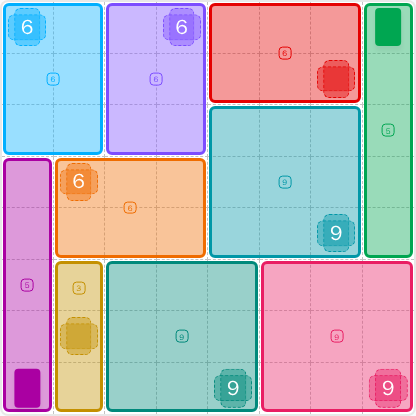
In LinkedIn Patches #89 hints for 2026-06-15 02:41:30, the 6-cell patches are the most helpful early anchors. Their space is tight enough that they form neat rectangular blocks instead of wandering shapes.
The tall patches on the far left and far right act like vertical dividers. Once they are placed, they split the board into upper and lower zones and narrow the remaining Patches solutions.
The larger patches near the middle of the grid are forced by the surrounding border pieces. When the outer regions are fixed, the center becomes a pair of clean connected blocks.
For LinkedIn Patches #89, the last open spaces are the ones that would otherwise be cut off. Check the lower-left strip and the lower-right corner carefully so no cell is left isolated.
Still Stuck? Click on Reveal Patches #89 Answer below.
LinkedIn Patches #89 Answer
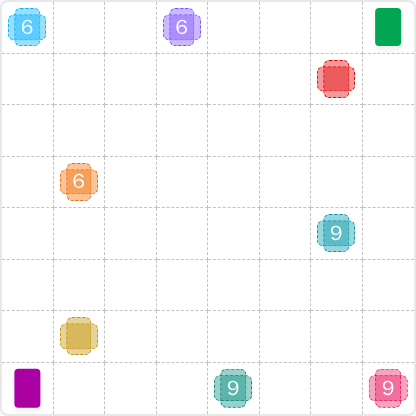
Original Puzzle
Final Answer
How to Solve LinkedIn Patches #89
Previous Patches Answers

Play Unlimited Patches Games
Enjoy unlimited Patches and other puzzle games anytime. No daily limits, just endless fun!
Play Now - Unlimited GamesMore LinkedIn Games Answers for Jun 14, 2026


Patches #89 FAQ
The LinkedIn Patches answer for #89 is the solved grid shown on this page for 2026-06-15 02:41:30. It fills the board with connected regions that match each number exactly.
Use border-first logic: place the corner and edge patches, then finish the center with the larger regions. That is the core of How to solve LinkedIn Patches #89.
The best LinkedIn Patches #89 hints focus on corners, long edge strips, and the restricted 6- and 9-cell regions. Those placements usually unlock the whole board.
Each number shows the exact size of that patch. For example, a 6 must occupy six connected cells, and the region cannot overlap any other patch.
Coordinates use rows first and columns second. R2C7 means row 2, column 7, counting from the top-left corner of the grid.
Scan for patches with the fewest shape options, especially corners and border pieces. This speeds up grid solutions and helps you avoid trial and error.
This page includes today's Patches solution, a step-by-step Patches puzzle guide, and a helpful LinkedIn Patches FAQ for puzzle number 89.