
LinkedIn Patches #86 Answer & Analysis
Stuck on LinkedIn Patches #86? Get spoiler-friendly Patches hints, the final grid solution, and a clear step-by-step explanation for today’s LinkedIn Patches puzzle.
This page includes the final answer and full analysis for LinkedIn Patches #86. Use the hints first if you want to solve the puzzle before revealing the answer.
LinkedIn Patches #86 Hints
Look first at the largest numbers that sit close to an outer boundary. In this puzzle, several patches naturally want to become clean rectangles along the left side and the top-right area. Edge placements reduce branching fast.
The 9 near the upper-right has very little freedom if it must stay connected and avoid awkward gaps. Test the obvious 3-by-3 expansion touching both the top edge and right edge.
The 7 on the far left works best as a tall strip. Once that is fixed, the nearby 14 has a natural rectangular expansion beside it. Be careful not to steal the bottom-left space needed by the small 3.
After the edge regions are settled, the 4 near the middle-left and the 3 above it help split the board into clean sections. Think of them as narrow vertical pieces that stop other patches from spreading too far.
Once the top and left structures are in place, the remaining open area on the right and bottom fits into a few tidy blocks. If you leave any isolated single cells or L-shaped leftovers, back up and re-check the divider patches.
Still Stuck? Click on Reveal Patches #86 Answer below.
LinkedIn Patches #86 Answer
Original Puzzle
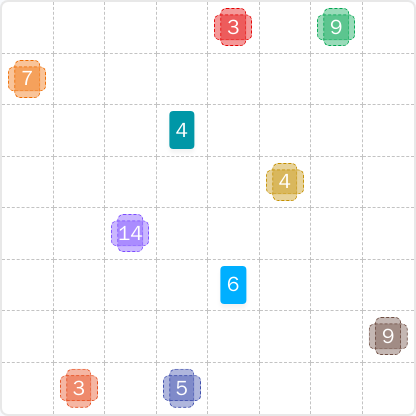
Final Answer
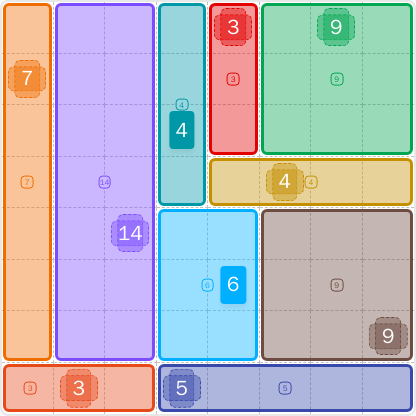
How to Solve LinkedIn Patches #86
Previous Patches Answers

Play Unlimited Patches Games
Enjoy unlimited Patches and other puzzle games anytime. No daily limits, just endless fun!
Play Now - Unlimited GamesMore LinkedIn Games Answers for Jun 11, 2026


Patches #86 FAQ
Today's Patches solution divides the 8x8 grid into ten clean regions: a left-edge 7, a tall 14 beside it, a vertical 4 in column 4, a vertical 3 in column 5, a top-right 9 block, a horizontal 4 on row 4, a 6 in the lower middle, a lower-right 9 block, a bottom-left 3, and a bottom-row 5. The full solved layout is explained in the guide above.
Start with the most restricted edge regions. For LinkedIn Patches #86, the top-right 9, the left-edge 7, and the tall 14 are the main anchors. After that, the central 4 and top-center 3 divide the board so the remaining patches fall into place.
The best LinkedIn Patches #86 hints are to use the top-right 9 as an edge-locked block, keep the left-edge 7 narrow, and avoid taking space needed by the bottom-left 3. Large rectangular regions are the key to this puzzle.
Each number shows how many cells belong to that patch. Every patch must contain exactly that many connected cells, patches cannot overlap, and the whole grid must be filled.
R2C7 means row 2, column 7. Rows are counted from top to bottom, and columns are counted from left to right. This format is useful when describing grid solutions precisely.
Look for patches touching corners and edges first, then check which larger numbers only fit in one clean shape. A good Patches puzzle guide also helps you spot dividing regions that prevent isolated cells.