
LinkedIn Patches #75 Answer & Analysis
Stuck on LinkedIn Patches #75? Get spoiler-friendly Patches hints, the final grid solution, and a clear step-by-step explanation for today’s LinkedIn Patches puzzle.
This page includes the final answer and full analysis for LinkedIn Patches #75. Use the hints first if you want to solve the puzzle before revealing the answer.
LinkedIn Patches #75 Hints
In LinkedIn Patches #75, the biggest clue is space. The top-left corner, the top edge, and the far-right side all limit where large patches can go, so those are the best places to lock in first.
Look for the narrow gap between the left section and the middle section. That area can only support a very small patch before a taller vertical region takes over, which helps anchor the center of the grid.
The middle of the board splits the puzzle into left and right halves. Once the top patches are placed, the central regions become much easier to place because they must connect without breaking the remaining open space.
One 6-cell patch is forced into a compact left-side block, and the other nearby large region has to sit just to its right. This is where many solvers make progress in today's Patches solution.
The bottom edge ends up being one clean, continuous region. If you save that space until the end, it helps confirm the final layout and prevents accidental isolated cells.
Still Stuck? Click on Reveal Patches #75 Answer below.
LinkedIn Patches #75 Answer
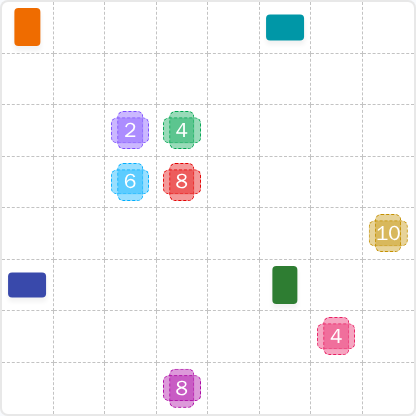
Original Puzzle
Final Answer
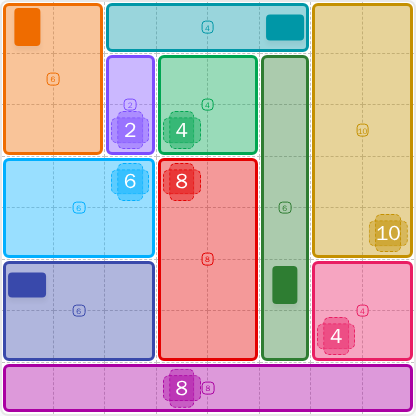
How to Solve LinkedIn Patches #75
Previous Patches Answers

Play Unlimited Patches Games
Enjoy unlimited Patches and other puzzle games anytime. No daily limits, just endless fun!
Play Now - Unlimited GamesMore LinkedIn Games Answers for May 31, 2026


Patches #75 FAQ
The full LinkedIn Patches answer for 2026-05-31 15:00:15 is included on this page, along with the solved layout and a clear Patches puzzle guide.
Start with the corner and edge-bound patches, then place the narrow center pieces, and finish with the remaining large connected regions. That is the fastest route to today's Patches solution.
The best Patches hints focus on the top edge, the right-side 10-cell region, and the long bottom strip. Those areas are the easiest way to narrow down the grid.
Each number tells you how many cells that patch must contain. Every patch must be one connected group of cells, with no overlaps.
R means row and C means column. So R2C7 means row 2, column 7. This coordinate style is commonly used in grid solutions and Patches solutions.
Use elimination: lock in corners first, check long edges next, and keep an eye on isolated cells. That approach is the best shortcut for LinkedIn Patches #75 hints and future puzzles.
Yes. This daily answer page is designed to show the completed layout, the LinkedIn Patches answer, and supporting FAQ guidance for search users.