
LinkedIn Patches #74 Answer & Analysis
Stuck on LinkedIn Patches #74? Get spoiler-friendly Patches hints, the final grid solution, and a clear step-by-step explanation for today’s LinkedIn Patches puzzle.
This page includes the final answer and full analysis for LinkedIn Patches #74. Use the hints first if you want to solve the puzzle before revealing the answer.
LinkedIn Patches #74 Hints
In this puzzle, the corner and border clues are the easiest to lock in. Edge-bound patches have fewer placement options, so they should be solved before anything in the middle.
Several clues can only fit one sensible rectangle or strip because the board boundary cuts off other options. That is a strong sign you are dealing with a fixed corner piece or a narrow edge piece.
The larger patches do not just fill space; they also separate the grid into upper and lower zones. Once one of those bigger regions is placed, the remaining open space becomes much easier to read.
There is a long mid-board section that acts like a divider. If you place it correctly, it prevents isolated cells and makes the left and right sides line up cleanly.
The last few spaces in today's LinkedIn Patches puzzle are simple once the larger areas are fixed. Check the lower-right and lower-left corners carefully so every patch stays connected and the full grid is covered.
Still Stuck? Click on Reveal Patches #74 Answer below.
LinkedIn Patches #74 Answer
Original Puzzle
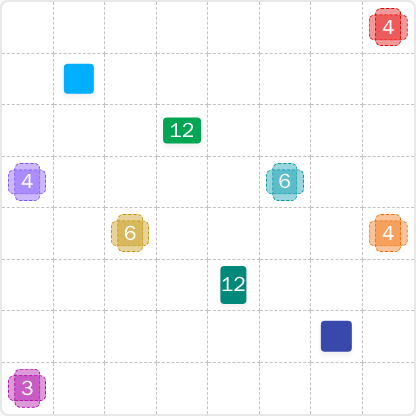
Final Answer
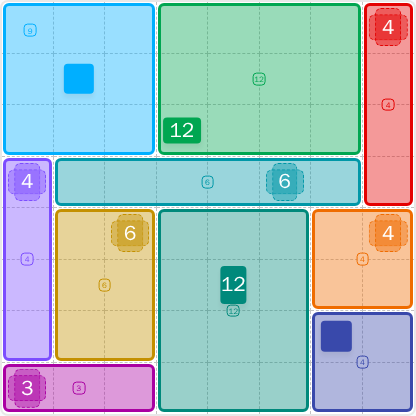
How to Solve LinkedIn Patches #74
Previous Patches Answers

Play Unlimited Patches Games
Enjoy unlimited Patches and other puzzle games anytime. No daily limits, just endless fun!
Play Now - Unlimited GamesMore LinkedIn Games Answers for May 30, 2026


Patches #74 FAQ
The LinkedIn Patches answer for 2026-05-30 15:00:16 is the fully tiled 8x8 layout shown on this page. It includes the corner, edge, and center patches arranged to satisfy every number exactly.
Start with the most restricted edge and corner pieces, then place the large 12-cell and 6-cell regions that divide the board. After that, the remaining patches fit naturally into the open spaces.
The best LinkedIn Patches #74 hints are to check the corners first, use the long middle band as a divider, and avoid leaving isolated cells in the lower half of the grid.
Each number shows how many cells that patch must contain. For example, a 4 means a connected 4-cell region, while 12 means a connected region of twelve cells.
R2C7 means row 2, column 7, counting rows from top to bottom and columns from left to right. Coordinates are a fast way to reference exact cells in the grid solutions.
Work from the border inward, place the largest forced regions early, and check that every patch stays connected. This approach makes today's Patches solution easier to confirm.