
LinkedIn Patches #67 Answer & Analysis
Stuck on LinkedIn Patches #67? Get spoiler-friendly Patches hints, the final grid solution, and a clear step-by-step explanation for today’s LinkedIn Patches puzzle.
This page includes the final answer and full analysis for LinkedIn Patches #67. Use the hints first if you want to solve the puzzle before revealing the answer.
LinkedIn Patches #67 Hints
In this puzzle, the corner and edge patches are the easiest to lock in first. Look for numbered regions that cannot expand much because the board boundary blocks them.
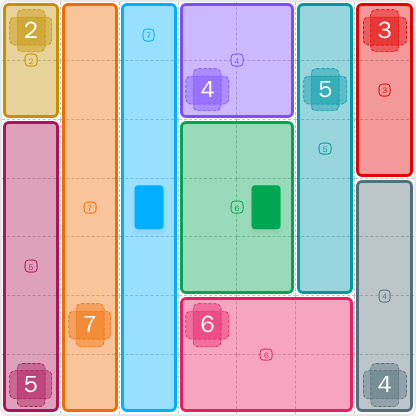
The two 7-cell patches are especially important in LinkedIn Patches #67. A full-height or nearly full-height strip often removes a lot of uncertainty from the grid.
The middle of the board contains a patch that splits the grid into upper and lower sections. Once that region is fixed, the remaining spaces become much easier to read.
The 4-cell and 5-cell patches have limited shape choices once the long strips are set. Check which rectangles remain connected and large enough for each patch.
The last step in today's Patches solution is to make sure no single cell is left stranded. Every patch must stay connected, so the final layout should feel compact and complete.
Still Stuck? Click on Reveal Patches #67 Answer below.
LinkedIn Patches #67 Answer
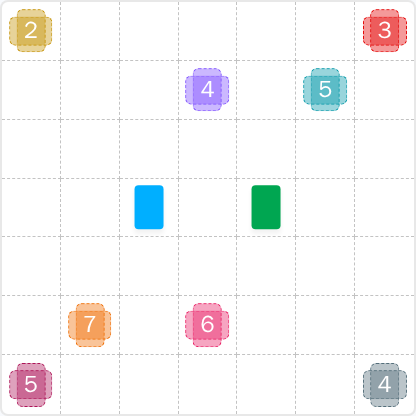
Original Puzzle
Final Answer
How to Solve LinkedIn Patches #67
Previous Patches Answers

Play Unlimited Patches Games
Enjoy unlimited Patches and other puzzle games anytime. No daily limits, just endless fun!
Play Now - Unlimited GamesMore LinkedIn Games Answers for May 23, 2026


Patches #67 FAQ
The LinkedIn Patches answer for 2026-05-23 15:00:15 is the completed 7x7 layout shown on the page, with the corner patches, long vertical strips, center block, and bottom rectangle all fitting cleanly.
The fastest way is to place the most restricted edge and corner patches first, then use the long strips to divide the board. From there, the remaining regions in today's LinkedIn Patches puzzle become easier to fit.
The best Patches hints focus on borders, connected space, and the patches with the fewest placement options. Start with the edges, then solve the center, then finish the last open rectangles.
The numbers show how many cells each patch must cover. A 4 means a 4-cell connected region, a 6 means a 6-cell region, and so on. The goal is to build all patches without overlap.
R2C7 means row 2, column 7. Rows go top to bottom and columns go left to right. Coordinates are useful for explaining grid solutions and checking today's Patches solution quickly.
Look for the most limited shapes first, especially corners and full-height or full-width regions. That approach is the core of a good Patches puzzle guide and usually speeds up daily puzzle solving.
This page includes the LinkedIn Patches FAQ, Patches solutions, and a clear grid-based explanation of the puzzle answer so you can compare your work with today's completed layout.