
LinkedIn Patches #68 Answer & Analysis
Stuck on LinkedIn Patches #68? Get spoiler-friendly Patches hints, the final grid solution, and a clear step-by-step explanation for today’s LinkedIn Patches puzzle.
This page includes the final answer and full analysis for LinkedIn Patches #68. Use the hints first if you want to solve the puzzle before revealing the answer.
LinkedIn Patches #68 Hints
In this puzzle, the most reliable placements come from the border clues. Corner-adjacent patches have limited expansion space, so check the left edge, top row, and right-side edge patches first.
Several clues sit in thin lanes that can only support one clean 4-cell run. That means the top and left-side bands quickly become fixed once you respect the board boundaries.
The strongest shape constraints appear in the narrow vertical columns near the left half of the board. They are forced to stay connected from top to bottom without breaking into separate pieces.
The larger patches on the right side of the middle rows must fit around the small 2-cell clue. If you place the 6-cell area too loosely, you will isolate a cell and the grid stops working.
The last few placements should eliminate any isolated gaps in the lower half. If a space can only be filled by one exact patch size, that is usually the correct move in today's Patches solution.
Still Stuck? Click on Reveal Patches #68 Answer below.
LinkedIn Patches #68 Answer
Original Puzzle
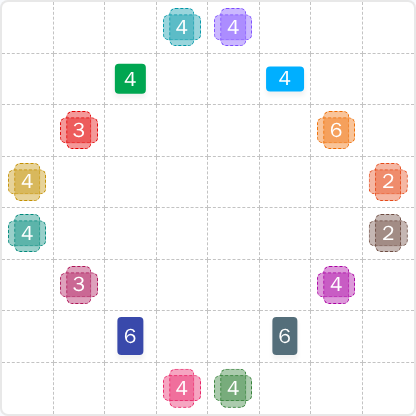
Final Answer
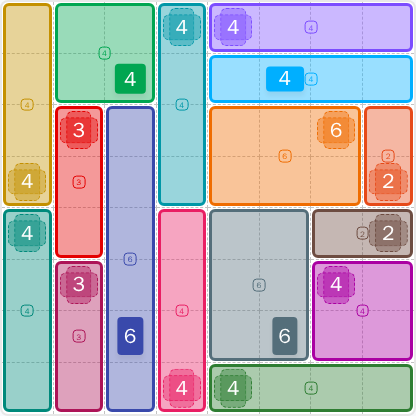
How to Solve LinkedIn Patches #68
Previous Patches Answers

Play Unlimited Patches Games
Enjoy unlimited Patches and other puzzle games anytime. No daily limits, just endless fun!
Play Now - Unlimited GamesMore LinkedIn Games Answers for May 24, 2026


Patches #68 FAQ
The LinkedIn Patches answer for puzzle #68 is shown on this page with the solved layout and a clear breakdown of the patch placements.
Use edge clues first, then fit the larger 4-cell and 6-cell regions, and finally confirm that every patch stays connected. The full How to solve LinkedIn Patches #68 guide is included above.
The best Patches hints focus on restricted border space, corner anchors, and the way the center patches divide the board. Those ideas solve most daily grid solutions quickly.
Each number tells you how many cells that patch must contain. The cells must stay connected, and the final board must fill completely without overlaps.
R2C7 means row 2, column 7, counting rows from top to bottom and columns from left to right. It is the easiest way to reference a specific cell in today's LinkedIn Patches puzzle.
Start with the most restricted patches, especially edge and corner clues. Then use the largest patch sizes to lock in the remaining space. This is the fastest way to complete today's Patches solution.
Yes. This page includes the LinkedIn Patches FAQ, the solving guide, and the completed grid logic for LinkedIn Patches 2026-05-24 15:00:15.