
LinkedIn Patches #49 Answer & Analysis
Stuck on LinkedIn Patches #49? Get spoiler-friendly Patches hints, the final grid solution, and a clear step-by-step explanation for today’s LinkedIn Patches puzzle.
This page includes the final answer and full analysis for LinkedIn Patches #49. Use the hints first if you want to solve the puzzle before revealing the answer.
LinkedIn Patches #49 Hints
In LinkedIn Patches #49, the corner and edge-adjacent patches have the fewest legal shapes. Lock those in first so the rest of the grid has fewer possibilities.
The smallest numbered patches are the easiest to force from the outline of the board. Once those are placed, the surrounding Patches solutions become much clearer.
The biggest numbered area should be placed where it can stay connected and still leave room for the remaining patches. In this puzzle, that large patch acts like a divider across the center.
The upper group of patches and the lower group interact, but each band also has its own constraints. Working one band at a time makes today's Patches solution easier to see.
Any placement that leaves one uncovered square stranded should be rejected. That final connectivity check is one of the most useful LinkedIn Patches #49 hints before confirming the full layout.
Still Stuck? Click on Reveal Patches #49 Answer below.
LinkedIn Patches #49 Answer
Original Puzzle
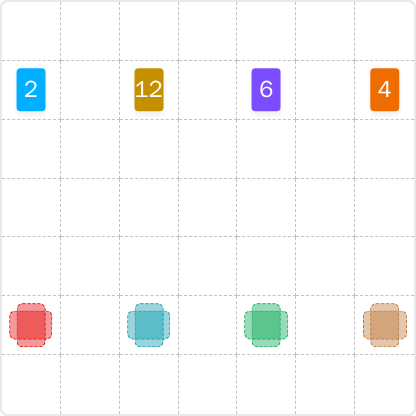
Final Answer
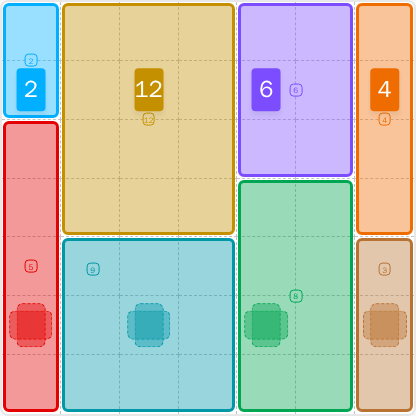
How to Solve LinkedIn Patches #49
Previous Patches Answers

Play Unlimited Patches Games
Enjoy unlimited Patches and other puzzle games anytime. No daily limits, just endless fun!
Play Now - Unlimited GamesMore LinkedIn Games Answers for May 5, 2026


Patches #49 FAQ
The full solved layout for LinkedIn Patches #49 on 2026-05-05 15:00:15 is included on this page. Use the solved grid to check the exact patch placements.
Start with the most restricted edge and corner patches, then place the largest region, and finish by filling the remaining connected spaces. That is the core method for today's Patches solution.
The strongest LinkedIn Patches #49 hints are to work from the borders inward and avoid trapping single uncovered cells in the center.
Each number tells you how many cells that patch must contain. The final region must be connected and must match that size exactly.
R2C7 means row 2, column 7, counted from the top-left corner. Coordinates are helpful when comparing your work with grid solutions.
Use edge constraints first, then place the largest shape that has only one or two valid locations. This is the fastest way to approach Patches puzzle guide logic.