
LinkedIn Patches #48 Answer & Analysis
Stuck on LinkedIn Patches #48? Get spoiler-friendly Patches hints, the final grid solution, and a clear step-by-step explanation for today’s LinkedIn Patches puzzle.
This page includes the final answer and full analysis for LinkedIn Patches #48. Use the hints first if you want to solve the puzzle before revealing the answer.
LinkedIn Patches #48 Hints
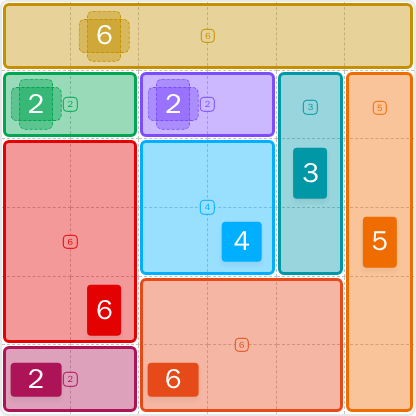
The top 6 is the most obvious anchor in LinkedIn Patches #48. When a large number fits a clean border, it usually fixes an entire band and simplifies the rest of the board.
The two 2-cell patches near the upper-left and upper-middle are tightly packed. Place them before you spend space on the larger regions, because they help define the board's early structure.
A vertical patch on the right side creates a hard boundary that splits the grid. That strip limits where the nearby 3-cell region can grow and keeps the center from drifting too far right.
The middle area is controlled by a compact 4-cell patch and a 3-cell patch. If you place them correctly, they protect the left and lower regions from overlapping paths.
The last open cells are in the lower-left and lower-middle bands. Keep every patch connected and avoid leaving a single stranded cell, which is the main trap in today's Patches solution.
Still Stuck? Click on Reveal Patches #48 Answer below.
LinkedIn Patches #48 Answer
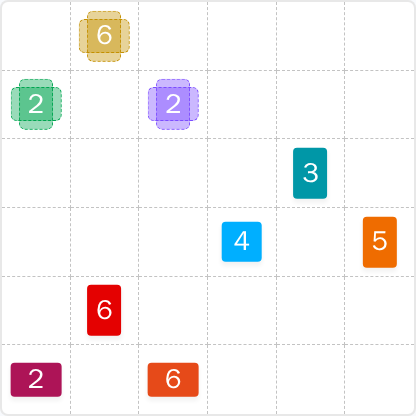
Original Puzzle
Final Answer
How to Solve LinkedIn Patches #48
Previous Patches Answers

Play Unlimited Patches Games
Enjoy unlimited Patches and other puzzle games anytime. No daily limits, just endless fun!
Play Now - Unlimited GamesMore LinkedIn Games Answers for May 4, 2026


Patches #48 FAQ
The solved layout for LinkedIn Patches #48 is included on this page for 2026-05-04 15:00:12, along with the key patch placements that make up today's Patches solution.
Start with the most constrained patches first, especially the top edge and right edge, then place the center and lower regions. The guide above shows the logic behind the LinkedIn Patches answer.
The best LinkedIn Patches #48 hints point to the top strip, the right-side vertical lane, and the limited center space. Those clues usually unlock the rest of the board quickly.
Each number tells you how many cells the patch must cover. The cells must stay connected, and every patch must fit without overlapping another region.
R means row and C means column. So R2C7 means row 2, column 7, counted from the top-left corner of the grid.
Use a biggest-and-tightest-first approach: solve edge and corner patches, watch for restricted spaces, and avoid creating isolated cells. That method works well on today's LinkedIn Patches puzzle.
Yes. The page includes the solved layout, the Patches puzzle guide, and helpful Patches solutions so you can compare your work with the intended grid solutions.