
LinkedIn Patches #47 Answer & Analysis
Stuck on LinkedIn Patches #47? Get spoiler-friendly Patches hints, the final grid solution, and a clear step-by-step explanation for today’s LinkedIn Patches puzzle.
This page includes the final answer and full analysis for LinkedIn Patches #47. Use the hints first if you want to solve the puzzle before revealing the answer.
LinkedIn Patches #47 Hints
Begin with the corner and edge clues. In today’s LinkedIn Patches puzzle, the small patches near the top-left and top-right have the fewest possible directions to grow, so they are the safest starting points.
The large patch on the top row is forced to stretch horizontally because there is little vertical room above it. That makes the first row a key anchor for the rest of the grid.
Several patches in the middle need long straight runs. Those columns act like separators, so once one strip is fixed, the neighboring regions become much easier to place without overlap.
The left-middle region needs enough connected space to reach its full size. If you extend the nearby patches too early, you can accidentally trap a small gap that no patch can legally fill.
The bottom and right-side spaces only work if the medium and large patches leave a clean connected corridor. This is the final check in the Patches puzzle guide for LinkedIn Patches #47.
Still Stuck? Click on Reveal Patches #47 Answer below.
LinkedIn Patches #47 Answer
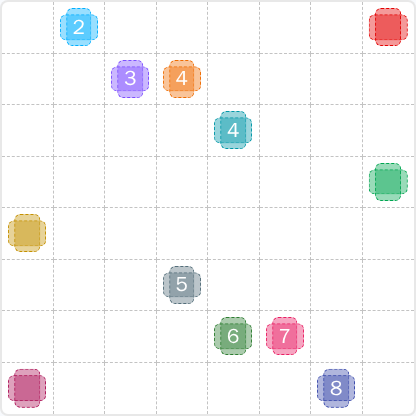
Original Puzzle
Final Answer
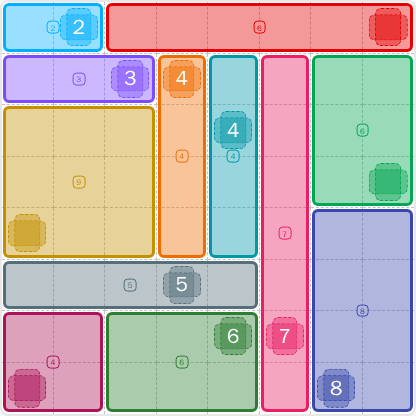
How to Solve LinkedIn Patches #47
Previous Patches Answers

Play Unlimited Patches Games
Enjoy unlimited Patches and other puzzle games anytime. No daily limits, just endless fun!
Play Now - Unlimited GamesMore LinkedIn Games Answers for May 3, 2026


Patches #47 FAQ
The page includes the full today's Patches solution for LinkedIn Patches #47 on 2026-05-03 15:00:15, along with a clear breakdown of the solved grid.
Start with the edge and corner patches, then lock the long central strips, and finish the remaining open regions. That is the fastest way to solve today’s LinkedIn Patches puzzle.
The best LinkedIn Patches #47 hints focus on boundary pressure, restricted expansion space, and the large patches that split the board into smaller connected regions.
Each number shows how many cells that patch must occupy. The patch must also stay connected, so the goal is to grow each region to the correct size without overlaps.
R2C7 means row 2, column 7. Rows go top to bottom and columns go left to right, which makes it easier to describe grid solutions clearly.
Work from the most restricted patches first, then use the remaining space to confirm the larger regions. This reduces guesswork and helps you reach the correct Patches solutions faster.
Yes. The page is built as a LinkedIn Patches answer and guide, so it can include the solved layout, helpful hints, and a short explanation of the final grid.