
LinkedIn Patches #95 Answer & Analysis
Stuck on LinkedIn Patches #95? Get spoiler-friendly Patches hints, the final grid solution, and a clear step-by-step explanation for today’s LinkedIn Patches puzzle.
This page includes the final answer and full analysis for LinkedIn Patches #95. Use the hints first if you want to solve the puzzle before revealing the answer.
LinkedIn Patches #95 Hints
For LinkedIn Patches #95 on 2026-06-20 15:00:17, begin with the patches that touch the outer border. Corner-locked and edge-locked shapes are usually the quickest way to reduce possibilities in today's LinkedIn Patches puzzle.
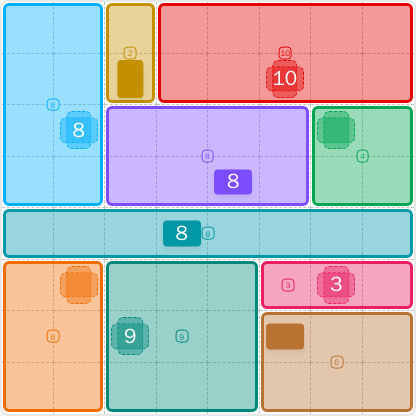
The largest patch needs the broadest continuous space, so check the upper-right side before the smaller regions. Wide patches often force the shape of the rest of the board in this style of Patches solutions.
The left side and the narrow top-center column leave very little freedom. Once those pieces are fixed, the upper band becomes much easier to read and you can avoid cutting the board into impossible fragments.
One long horizontal region runs through the center of the board and acts like a separator. In a Patches puzzle guide, this kind of band is important because it cleanly divides the top half from the bottom half.
The bottom half has several patches that must fit together without leaving single-cell gaps. Pay special attention to the small right-side patch and the larger block below it, since they compete for the same space.
If you are stuck, test the remaining patches against the open areas one by one. In LinkedIn Patches #95 hints, the last few regions are often decided by eliminating every other possible placement.
Still Stuck? Click on Reveal Patches #95 Answer below.
LinkedIn Patches #95 Answer
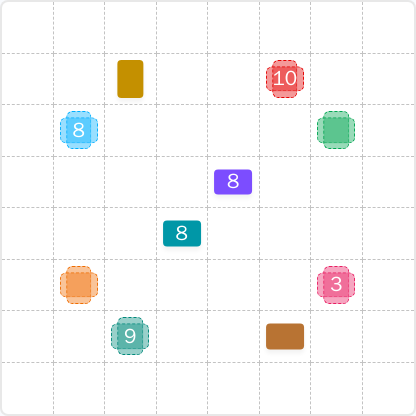
Original Puzzle
Final Answer
How to Solve LinkedIn Patches #95
Previous Patches Answers

Play Unlimited Patches Games
Enjoy unlimited Patches and other puzzle games anytime. No daily limits, just endless fun!
Play Now - Unlimited GamesMore LinkedIn Games Answers for Jun 20, 2026



Patches #95 FAQ
The LinkedIn Patches answer for #95 is the fully solved grid shown on this page for 2026-06-20 15:00:17. The layout is resolved into connected regions that fill the entire board.
Start with the most restricted edge and corner patches, then place the wide top band, the middle divider, and the bottom blocks. That is the fastest way to follow today's LinkedIn Patches puzzle logic.
The best Patches hints focus on the border-locked pieces, the large upper-right region, and the long center strip. Those shapes drive most of the deductions in this puzzle.
Each number tells you how many cells that patch must contain. The cells must stay connected, must not overlap other patches, and must cover the full board.
R means row and C means column. So R2C7 means row 2, column 7, counted from the top-left corner of the grid.
Use a consistent Patches puzzle guide: place the easiest edge patches first, confirm any large regions early, and use the remaining gaps to eliminate impossible placements. That approach speeds up grid solutions.
Yes. The page includes the completed LinkedIn Patches #95 solution, plus hints and a short explanation so you can compare your work with the final grid.