
LinkedIn Patches #94 Answer & Analysis
Stuck on LinkedIn Patches #94? Get spoiler-friendly Patches hints, the final grid solution, and a clear step-by-step explanation for today’s LinkedIn Patches puzzle.
This page includes the final answer and full analysis for LinkedIn Patches #94. Use the hints first if you want to solve the puzzle before revealing the answer.
LinkedIn Patches #94 Hints
For LinkedIn Patches #94 on 2026-06-19 15:00:19, start with the edges and corners. The biggest boundary-limited patches are easiest to lock in before you work toward the center.
The first two rows are heavily constrained. Look for patches that must stretch horizontally across the top without leaving any isolated cells behind them.
One long patch runs down the left edge, and that side is so narrow that there is very little room for alternatives. Once that wall is fixed, several nearby regions become forced.
The center of this board is split by a small set of connected regions. Solve those central patches carefully so they do not block the larger regions on either side.
The last entries are the biggest patches in the lower half and right side. If you keep every patch connected and avoid trapping a single empty cell, the rest of today's LinkedIn Patches puzzle falls into place.
Still Stuck? Click on Reveal Patches #94 Answer below.
LinkedIn Patches #94 Answer
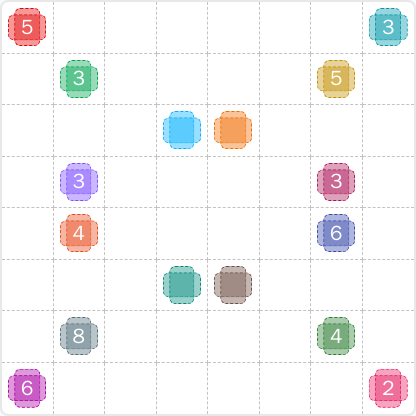
Original Puzzle
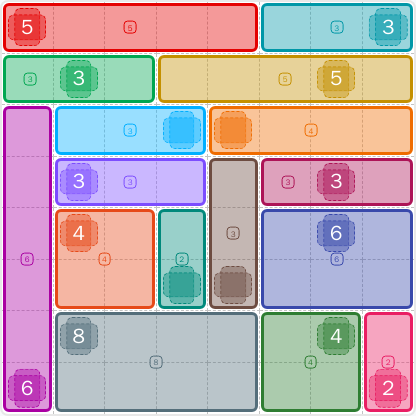
Final Answer
How to Solve LinkedIn Patches #94
Previous Patches Answers

Play Unlimited Patches Games
Enjoy unlimited Patches and other puzzle games anytime. No daily limits, just endless fun!
Play Now - Unlimited GamesMore LinkedIn Games Answers for Jun 19, 2026


Patches #94 FAQ
The LinkedIn Patches answer for 2026-06-19 15:00:19 is the completed grid shown on the page, with every numbered patch placed to match its size and connections.
Start with the edge-locked patches, then fill the center divider, and finish with the large lower regions. That is the fastest way to read today's LinkedIn Patches puzzle.
The best LinkedIn Patches #94 hints focus on borders first, then the central split, then the biggest remaining patches. That approach avoids isolated cells.
Each number shows how many cells the patch must contain. The cells in that patch must stay connected, and no two patches can overlap.
R2C7 means row 2, column 7, counted from the top-left corner of the grid. It is a quick way to reference exact cells in the Patches puzzle guide.
Work from the most restricted areas first, especially corners and edges, and check each placement against the patch size. This is the best method for quicker grid solutions.
Yes. The page includes the today's Patches solution summary and the reasoning behind the final placement, so you can compare your work with the LinkedIn Patches FAQ guidance.