
LinkedIn Patches #60 Answer & Analysis
Stuck on LinkedIn Patches #60? Get spoiler-friendly Patches hints, the final grid solution, and a clear step-by-step explanation for today’s LinkedIn Patches puzzle.
This page includes the final answer and full analysis for LinkedIn Patches #60. Use the hints first if you want to solve the puzzle before revealing the answer.
LinkedIn Patches #60 Hints
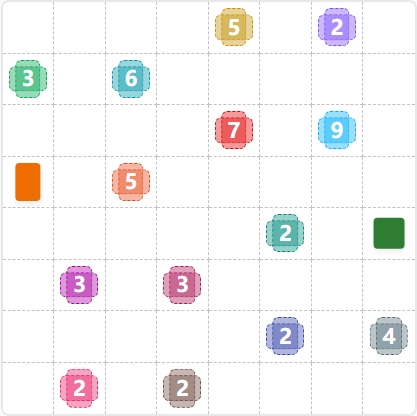
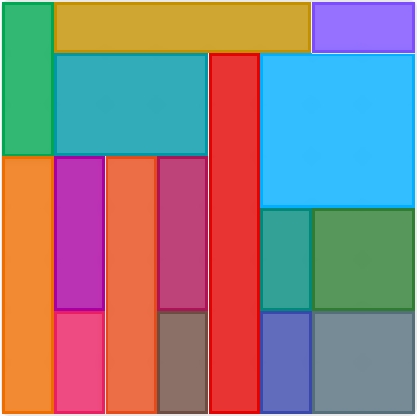
Look for the large numbered patches first. In this grid, the central 7 and the upper-right 9 have very limited room, so they quickly define the puzzle skeleton.
Edge and corner patches are much easier to place than interior ones. The top row, left edge, and upper-right corner all lock in early in today's LinkedIn Patches puzzle.
The middle column acts like a divider. Once one long patch claims that space, the nearby regions can only fit in compact blocks on either side.
Several 2-cell patches must stay tight to avoid isolating single cells. These are especially useful in the lower half of the board, where space gets tight fast.
The 6-cell and 9-cell patches in the top half each need compact, connected space. If one placement blocks the other, you know the shape is wrong.
Still Stuck? Click on Reveal Patches #60 Answer below.
LinkedIn Patches #60 Answer
Original Puzzle
Final Answer
How to Solve LinkedIn Patches #60
Previous Patches Answers

Play Unlimited Patches Games
Enjoy unlimited Patches and other puzzle games anytime. No daily limits, just endless fun!
Play Now - Unlimited GamesMore LinkedIn Games Answers for May 16, 2026


Patches #60 FAQ
The page includes the full solved layout for LinkedIn Patches #60, along with a clear explanation of how each patch fits the grid.
Start with the most restricted patches first: the center spine, the top row, the corner blocks, and then the smaller lower patches. That is the fastest route through today's LinkedIn Patches puzzle.
Focus on edge clues, corner clues, and the large center-divider patch. Those are the most useful LinkedIn Patches #60 hints for breaking the grid open.
Each number tells you how many cells that patch must contain. The patch must stay connected, and all patches together must fill the grid.
R2C7 means row 2, column 7. It is a simple way to reference a cell when reading a Patches puzzle guide or comparing grid solutions.
Place the most constrained regions first, then use the remaining empty space to confirm the smaller patches. That method makes today's Patches solution much quicker to find.
Yes. The page is designed as a daily LinkedIn Patches answer page with a solved layout, short hints, and a practical explanation of the final grid.