
LinkedIn Patches #51 Answer & Analysis
Stuck on LinkedIn Patches #51? Get spoiler-friendly Patches hints, the final grid solution, and a clear step-by-step explanation for today’s LinkedIn Patches puzzle.
This page includes the final answer and full analysis for LinkedIn Patches #51. Use the hints first if you want to solve the puzzle before revealing the answer.
LinkedIn Patches #51 Hints
In a Patches puzzle, the most restricted shapes usually settle first. For #51, the corner-adjacent regions on the top and side edges have very little room to expand, so use them to anchor the rest of the grid.
Large-number patches with tight space around them tend to be forced quickly. In today's LinkedIn Patches puzzle, the 4-cell regions near the top row and left side strongly limit how neighboring regions can spread.
The middle of the board helps split the grid into smaller connected areas. Once the top and left edge pieces are placed, the central horizontal region becomes a key divider that prevents isolated cells.
The right edge contains another compact region that must remain connected while avoiding overlap with the mid-board bands. That interaction is one of the main reasons today's Patches solution is not trivial.
When most patches are placed, scan for any leftover cell that would be stranded. The final fill in LinkedIn Patches #51 should complete every space without breaking connectivity in any numbered patch.
Still Stuck? Click on Reveal Patches #51 Answer below.
LinkedIn Patches #51 Answer
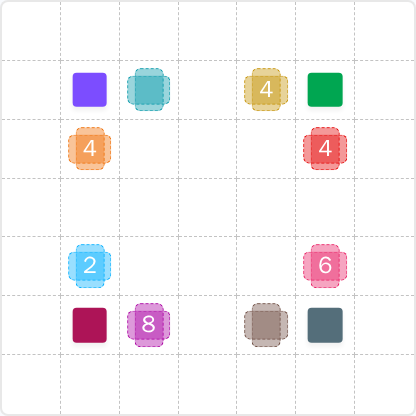
Original Puzzle
Final Answer
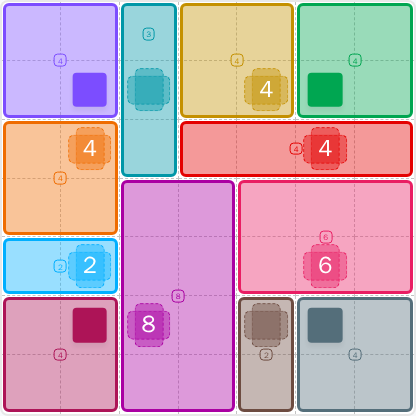
How to Solve LinkedIn Patches #51
Previous Patches Answers

Play Unlimited Patches Games
Enjoy unlimited Patches and other puzzle games anytime. No daily limits, just endless fun!
Play Now - Unlimited GamesMore LinkedIn Games Answers for May 7, 2026


Patches #51 FAQ
The full LinkedIn Patches answer for #51 is summarized on this page using the solved layout from 2026-05-07 15:00:16.
Start with the most restricted corner and edge patches, then use the center to separate regions. That is the core of How to solve LinkedIn Patches #51.
Focus on compact corner blocks, limited edge spaces, and the central divider. Those are the most useful LinkedIn Patches #51 hints.
Each number shows how many cells that patch must cover. The patch must be connected, and the total shape must match the clue exactly.
R means row and C means column. So R2C7 means row 2, column 7, counted from the top-left of the grid.
Work from the edges inward, place the largest forced patches first, and check for isolated cells early. That is the fastest approach for most Patches solutions.
Yes. The page is designed to support both Patches hints and the full today’s Patches solution, so you can use it as a quick answer page or a full Patches puzzle guide.