
LinkedIn Patches #83 Answer & Analysis
Stuck on LinkedIn Patches #83? Get spoiler-friendly Patches hints, the final grid solution, and a clear step-by-step explanation for today’s LinkedIn Patches puzzle.
This page includes the final answer and full analysis for LinkedIn Patches #83. Use the hints first if you want to solve the puzzle before revealing the answer.
LinkedIn Patches #83 Hints
For today's LinkedIn Patches puzzle, the edge clues are the easiest anchors. A numbered patch on or near an edge has fewer directions to expand, so begin by checking how much room each border clue has.
Several clues in LinkedIn Patches #83 are boxed in by the grid edge and neighboring numbers. When a patch size matches a clean rectangle or straight strip, that area is likely forced.
The 6 clue near the top-right corner cannot expand downward very freely because other clues block the interior. Think about whether it needs to use the top band of the grid.
The purple 4 and cyan 2 on the upper-right/center-right create a divider. Solve these before committing to the large red 9 region, because their boundaries determine how the bottom-right area fills.
On the left half, the 4 clues must stay connected while avoiding overlap. Once the upper-left and left-edge areas are fixed, the remaining center-left space falls into two compact 4-cell blocks.
Still Stuck? Click on Reveal Patches #83 Answer below.
LinkedIn Patches #83 Answer
Original Puzzle
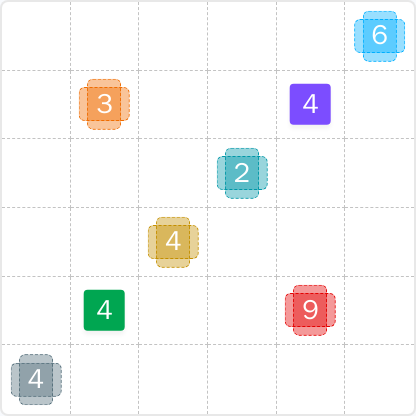
Final Answer
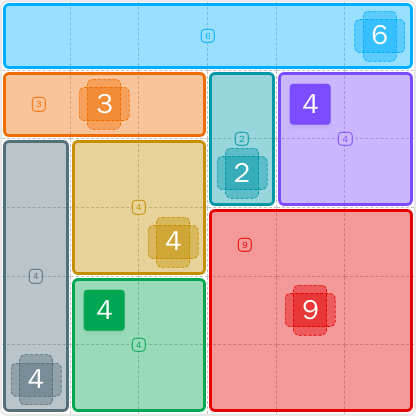
How to Solve LinkedIn Patches #83
Previous Patches Answers

Play Unlimited Patches Games
Enjoy unlimited Patches and other puzzle games anytime. No daily limits, just endless fun!
Play Now - Unlimited GamesMore LinkedIn Games Answers for Jun 8, 2026


Patches #83 FAQ
The LinkedIn Patches #83 answer for 2026-06-08 09:26:45 is a 6-by-6 solved layout with the blue 6 across the top row, a red 9 in the bottom-right 3-by-3 area, and the remaining patches filling the left and upper-right sections without overlap.
To solve LinkedIn Patches #83, start with the most restricted edge clues, especially the top-right 6. Then place the upper-left 3, the cyan 2, the purple 4, the left-edge 4, and finish with the remaining 4-cell blocks and the red 9.
The best LinkedIn Patches #83 hints are to focus on the top edge, use the upper-right patches as dividers, and avoid leaving isolated cells in the center-left. Edge clues are the key to today's Patches solution.
Each number tells you how many cells belong to that patch. For example, a 4 must cover exactly four connected cells, while a 9 must cover exactly nine connected cells.
Coordinates identify a cell by row and column. R means row, C means column, so R2C7 means row 2, column 7. Rows are counted from top to bottom, and columns are counted from left to right.
Solve restricted patches first: corners, edges, large numbers with limited space, and patches that divide the grid. This strategy works well for many Patches solutions and helps reduce guessing.
This daily page includes LinkedIn Patches #83 hints, a How to solve LinkedIn Patches #83 walkthrough, and a concise LinkedIn Patches FAQ for today's LinkedIn Patches puzzle.