
LinkedIn Patches #72 Answer & Analysis
Stuck on LinkedIn Patches #72? Get spoiler-friendly Patches hints, the final grid solution, and a clear step-by-step explanation for today’s LinkedIn Patches puzzle.
This page includes the final answer and full analysis for LinkedIn Patches #72. Use the hints first if you want to solve the puzzle before revealing the answer.
LinkedIn Patches #72 Hints
In LinkedIn Patches #72, the edge and corner regions are the most restrictive. When a patch touches only one side of the board, it usually has fewer placement options, so it is the best place to begin.
The 12-cell patch and the 6-cell patch need the most space, so they are usually forced earlier than smaller patches. In today's LinkedIn Patches puzzle, those larger regions help define the whole structure.
A tall patch on the far right is strongly constrained because there is only one column available there. That makes it a reliable anchor for the rest of the grid solutions.
Once the outer strips are locked in, the central 12-cell region has a very natural home. Avoid leaving narrow gaps around it, because those gaps can isolate cells and break the patch count.
The final steps in today's Patches solution should confirm that every numbered patch is one connected shape, every cell is used exactly once, and no patch is split across separated areas.
Still Stuck? Click on Reveal Patches #72 Answer below.
LinkedIn Patches #72 Answer
Original Puzzle
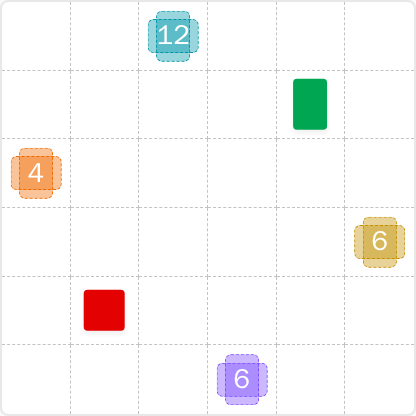
Final Answer
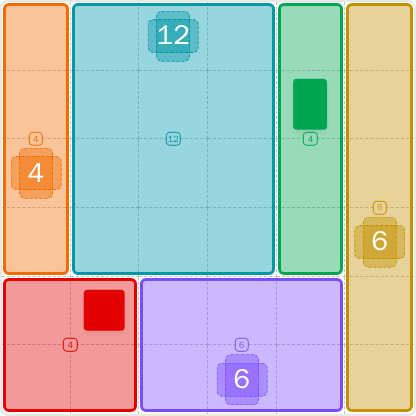
How to Solve LinkedIn Patches #72
Previous Patches Answers

Play Unlimited Patches Games
Enjoy unlimited Patches and other puzzle games anytime. No daily limits, just endless fun!
Play Now - Unlimited GamesMore LinkedIn Games Answers for May 28, 2026


Patches #72 FAQ
The LinkedIn Patches answer for 2026-05-28 15:00:12 is the clean strip-and-block layout shown on this page, with the full solved arrangement summarized in the steps and legend.
Start with the edge-limited patches, then place the large central region, and finish the remaining connected areas. That is the simplest Patches puzzle guide for today's LinkedIn Patches puzzle.
The best LinkedIn Patches #72 hints are to use the borders first, lock the largest patches early, and avoid leaving isolated cells in the center.
Each number tells you exactly how many cells that patch must contain. Every patch must stay connected and fill its full count without overlapping other patches.
R2C7 means row 2, column 7, counted from the top-left. This coordinate style is useful for reading grid solutions and discussing exact cells.
Solve the hardest border constraints first, then use the remaining space to force the center. This is the fastest way to approach Patches solutions and check your final board.
The full LinkedIn Patches FAQ page includes the solved layout, the logic behind it, and a compact summary of today's Patches solution for puzzle #72.