
LinkedIn Patches #70 Answer & Analysis
Stuck on LinkedIn Patches #70? Get spoiler-friendly Patches hints, the final grid solution, and a clear step-by-step explanation for today’s LinkedIn Patches puzzle.
This page includes the final answer and full analysis for LinkedIn Patches #70. Use the hints first if you want to solve the puzzle before revealing the answer.
LinkedIn Patches #70 Hints
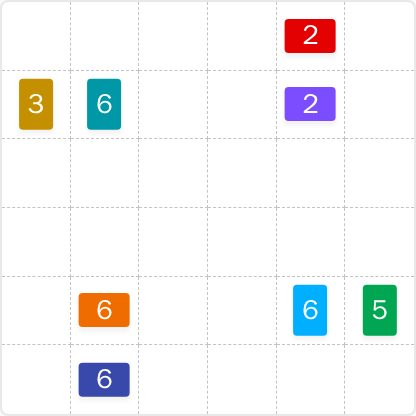
In LinkedIn Patches #70, the patches touching the outer edge are easier to place because they have fewer possible shapes. Look first at the left edge, the top-right area, and the long bottom band.
The 2-cell patches are the tightest clues in today's LinkedIn Patches puzzle. When a 2 sits near another edge-bound region, it usually has only one clean way to fit without leaving a stray cell.
The 3-cell patch on the left and the 5-cell patch on the far side strongly limit the surrounding space. Once those are set, the remaining open area becomes much easier to divide into the larger 6-cell regions.
A pair of small patches near the top-right region should stack in a way that keeps the board connected. If one placement creates an isolated cell, it is probably wrong.
The larger 6-cell patches in today's Patches solution act like separators. Use them to carve the board into clean connected blocks, then check that the last open cells still form a valid patch.
Before locking in the final grid, make sure no single cell or disconnected pocket is left behind. That final connectivity check is often the key to the correct LinkedIn Patches answer.
Still Stuck? Click on Reveal Patches #70 Answer below.
LinkedIn Patches #70 Answer
Original Puzzle
Final Answer
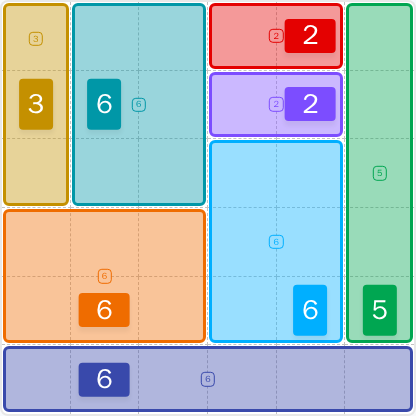
How to Solve LinkedIn Patches #70
Previous Patches Answers

Play Unlimited Patches Games
Enjoy unlimited Patches and other puzzle games anytime. No daily limits, just endless fun!
Play Now - Unlimited GamesMore LinkedIn Games Answers for May 26, 2026


Patches #70 FAQ
The full today's Patches solution for 2026-05-26 15:00:12 is shown on the page in the solved layout.
Start with the most restricted edge and corner patches, then place the larger 6-cell regions, and finish by checking that the whole grid stays connected.
The best LinkedIn Patches #70 hints focus on the left edge, the top-right stack of small patches, and the long bottom area that closes the board.
Each number tells you how many cells that patch must cover. The patch must be connected, and it cannot overlap any other patch.
R means row and C means column. So R2C7 means row 2, column 7. Coordinates are useful for tracking forced cells in grid solutions.
Use a scan-and-anchor method: place the smallest or most restricted clues first, then use the larger regions to eliminate impossible spaces.