
LinkedIn Patches #57 Answer & Analysis
Stuck on LinkedIn Patches #57? Get spoiler-friendly Patches hints, the final grid solution, and a clear step-by-step explanation for today’s LinkedIn Patches puzzle.
This page includes the final answer and full analysis for LinkedIn Patches #57. Use the hints first if you want to solve the puzzle before revealing the answer.
LinkedIn Patches #57 Hints
The safest first move in this puzzle is to look at the numbered patches touching the outer edge. Edge and corner patches have fewer places to grow, so they usually settle the fastest.
One patch needs a long, narrow run, so check which column has enough uninterrupted space to support it. That single decision helps lock several neighboring regions in place.
The top band and the far-right column are both tight. Once those patches are placed, they create clean boundaries that prevent smaller regions from drifting into the wrong area.
A larger middle patch acts like a separator. When it is placed correctly, the board splits into an upper section and a lower section, making the rest of the Patches puzzle guide much easier to follow.
After the big placements are fixed, the remaining open cells form a few narrow regions near the bottom and lower-right side. Those are usually forced by size and connectivity.
Still Stuck? Click on Reveal Patches #57 Answer below.
LinkedIn Patches #57 Answer
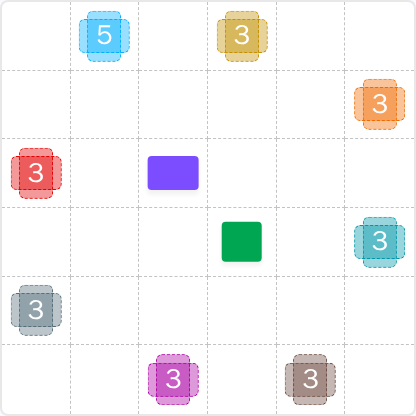
Original Puzzle
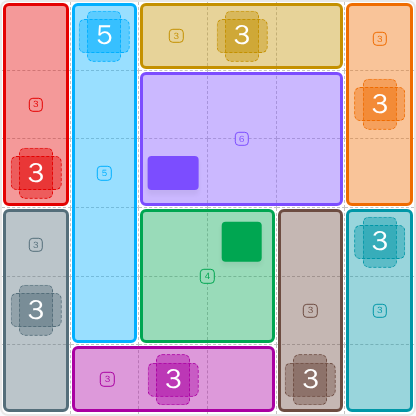
Final Answer
How to Solve LinkedIn Patches #57
Previous Patches Answers

Play Unlimited Patches Games
Enjoy unlimited Patches and other puzzle games anytime. No daily limits, just endless fun!
Play Now - Unlimited GamesMore LinkedIn Games Answers for May 13, 2026


Patches #57 FAQ
The LinkedIn Patches answer for puzzle #57 is the solved grid shown on this page for 2026-05-13 15:00:14. It uses a mix of edge strips, a central block, and smaller finishing regions.
Start with the most restricted edge and corner patches, then place the large center region, and finish with the remaining narrow spaces. That is the fastest way to approach today's LinkedIn Patches puzzle.
The best LinkedIn Patches #57 hints are to check the outer edges first, then use the center as a divider. The strongest clues are the long strip on the left and the large region in the middle.
Each number tells you how many cells that patch must contain. The patch must stay connected, cannot overlap other patches, and must fit the grid exactly.
R means row and C means column. So R2C7 means row 2, column 7. This coordinate style is useful when reading Patches solutions and grid solutions.
Use boundary logic first, then fill the most constrained numbered patches. That approach is the core of a good Patches puzzle guide and helps you finish faster.
This page is designed as a daily LinkedIn Patches answer resource, so it includes the main solution summary, Patches hints, and a clear explanation of the solved layout.