
LinkedIn Patches #43 Answer & Analysis
Stuck on LinkedIn Patches #43? Get spoiler-friendly Patches hints, the final grid solution, and a clear step-by-step explanation for today’s LinkedIn Patches puzzle.
This page includes the final answer and full analysis for LinkedIn Patches #43. Use the hints first if you want to solve the puzzle before revealing the answer.
LinkedIn Patches #43 Hints
In LinkedIn Patches #43, the corner-adjacent patches are the easiest place to begin. When a numbered patch touches an edge, that edge removes a lot of possible shapes.
Look for the patch that can only fit a compact shape near the upper-left area. Once that one is placed, it helps define the boundary for the rest of the grid.
One of the 9-cell patches has very limited room and wants to stay as a clean block near the top-right side. Avoid stretching it too far downward too soon.
The 12-cell patch on today’s Patches solution needs the most room and naturally expands down the left side. That makes the center line act like a divider between left and right.
For the final region, picture a simple staircase boundary: the left side drops lower than the right side. If a cell feels isolated, the patch boundaries are probably shifted incorrectly.
Still Stuck? Click on Reveal Patches #43 Answer below.
LinkedIn Patches #43 Answer
Original Puzzle
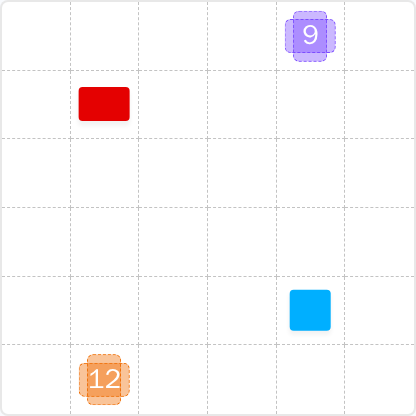
Final Answer
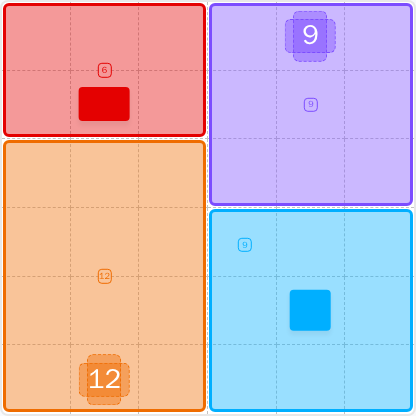
How to Solve LinkedIn Patches #43
Previous Patches Answers

Play Unlimited Patches Games
Enjoy unlimited Patches and other puzzle games anytime. No daily limits, just endless fun!
Play Now - Unlimited GamesMore LinkedIn Games Answers for Apr 29, 2026


Patches #43 FAQ
The LinkedIn Patches answer for 2026-04-29 16:00:11 is the four-region layout shown on the page: 6 cells top-left, 9 top-right, 12 bottom-left, and 9 bottom-right.
Start with the corner and edge patches, then place the largest region where it has the most space. That is the fastest path for How to solve LinkedIn Patches #43.
The best Patches hints are to use corners first, protect connected space, and avoid creating isolated cells in the center.
Each number shows how many cells that patch must contain. The patch must be one connected region of exactly that size.
R means row and C means column. So R2C7 means row 2, column 7, counted from the top-left.
Work from the tightest patches outward, confirm connectivity early, and use edge boundaries to eliminate impossible shapes. That approach is ideal for Patches solutions on daily grid puzzles.
This page includes a beginner-friendly Patches puzzle guide, the LinkedIn Patches FAQ, and the full daily grid solutions for LinkedIn Patches #43.